
The Death of the Web Form: Building Intent-Driven UIs in React
Have you ever opened a SaaS app just to log an expense, only to spend three minutes clicking through a multi-step modal, selecting drop-down menus, pickers, and checkboxes, all to submit three basic pieces of data?
For twenty years, web applications have forced users to adapt to the database. If a database table has six required columns, the UI gets six form inputs. We validate every keystroke, wrap them in complex form libraries, and call it “user experience.”
It’s time to flip the script.
With modern LLMs and React, we are moving from Input-Driven UIs (forms) to Intent-Driven UIs—where users express what they want to do, and the application dynamically constructs the action, validates the constraints, and presents a visual summary for confirmation.
1. Input-Driven vs. Intent-Driven UIs
Let’s look at how the same task plays out across both paradigms.
The Old Way: Input-Driven UI
Imagine adding a team member to a project with specific permissions:
1. Click “Team Management” -> Click “Add Member”
2. Type Email: alex@company.com
3. Select Role Dropdown: “Editor”
4. Select Project Dropdown: “Q3 Marketing Launch”
5. Toggle Switch: “Send Invite Email”
6. Click “Submit” -> Wait for API -> Render success toast
The Intent-Driven Way
The user types or speaks a single sentence: > “Invite alex@company.com to Q3 Marketing as an Editor”
The UI parses the intent, builds the exact confirmation state instantly, and asks for a single click to approve:
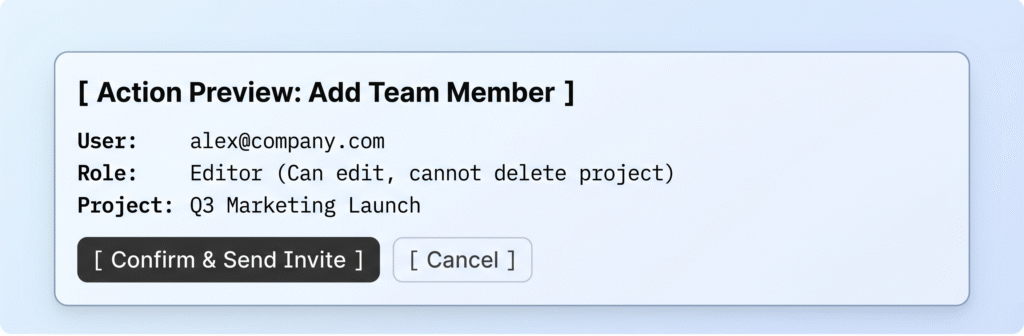
2. The Core Architecture
Building an intent-driven interface doesn’t mean replacing UI components with a generic text box. Instead, it turns user input into a structured schema that drives your existing UI components.
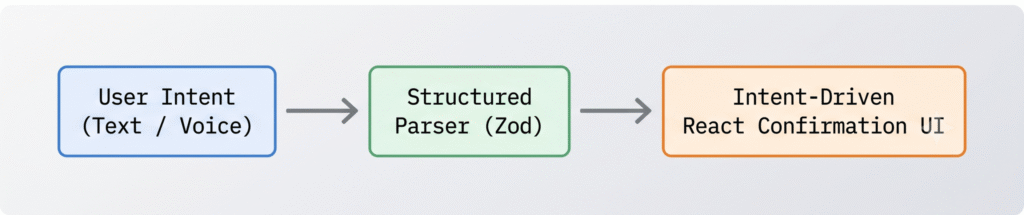
- User Intent:Natural language input describing the desired action.
- Structured Parser:An LLM function call (or lightweight edge parser) that outputs strict JSON matching a defined Zod
- Intent-Driven Component:A React component that takes the structured data, renders the exact state visually, and awaits user confirmation.
3. Live Example: The Smart Expense Logger
Let’s build a practical React component that replaces a tedious 5-field expense form with an Intent-Driven UI.
Step 1: Define the Action Schema
First, define what a valid action looks like using TypeScript and Zod:
					import { z } from "zod";

export const ExpenseActionSchema = z.object({
  amount: z.number().describe("The total monetary value"),
  currency: z.string().default("USD").describe("3-letter currency code"),
  category: z.enum(["Travel", "Food", "Software", "Office", "Other"]),
  merchant: z.string().describe("Name of the vendor or place"),
  date: z.string().describe("ISO date string (YYYY-MM-DD)"),
});

export type ExpenseAction = z.infer<typeof ExpenseActionSchema>;
Step 2: The Intent Parser Function
This function takes the raw user text and extracts the structured JSON.
					import { generateObject } from "ai"; // OpenAI / Vercel AI SDK
import { openai } from "@ai-sdk/openai";
import { ExpenseActionSchema } from "./schema";

export async function parseExpenseIntent(userInput: string) {
  const today = new Date().toISOString().split("T")[0];

  const { object } = await generateObject({
    model: openai("gpt-4o-mini"),
    schema: ExpenseActionSchema,
    prompt: `Today's date is ${today}. Extract the expense details from this input: "${userInput}"`,
  });

  return object; // Guarantees strong typing matching ExpenseActionSchema
}
Step 3: The React Confirmation Component
Instead of forcing the user to fill out input fields, the UI accepts the parsed intent and presents an interactive summary card.
					import React, { useState } from "react";
import { ExpenseAction } from "./schema";

interface Props {
  action: ExpenseAction;
  onConfirm: (data: ExpenseAction) => void;
  onCancel: () => void;
}

export const ExpenseConfirmationCard: React.FC<Props> = ({ action, onConfirm, onCancel }) => {
  const [data, setData] = useState<ExpenseAction>(action);

  return (
    <div className="border rounded-xl p-5 shadow-sm bg-white max-w-md">
      <div className="flex justify-between items-center mb-4">
        <h3 className="font-semibold text-lg text-gray-800">Confirm Expense</h3>
        <span className="px-2 py-1 bg-blue-50 text-blue-600 rounded text-xs font-medium">
          {data.category}
        </span>
      </div>

      <div className="space-y-3 mb-6">
        <div className="flex justify-between border-b pb-2">
          <span className="text-gray-500 text-sm">Merchant</span>
          <span className="font-medium text-sm">{data.merchant}</span>
        </div>

        <div className="flex justify-between border-b pb-2">
          <span className="text-gray-500 text-sm">Amount</span>
          <span className="font-semibold text-base text-green-600">
            {data.currency} ${data.amount.toFixed(2)}
          </span>
        </div>

        <div className="flex justify-between border-b pb-2">
          <span className="text-gray-500 text-sm">Date</span>
          <span className="font-medium text-sm">{data.date}</span>
        </div>
      </div>

      <div className="flex gap-3">
        <button
          onClick={() => onConfirm(data)}
          className="flex-1 bg-black text-white py-2 rounded-lg font-medium text-sm hover:bg-gray-800 transition"
        >
          Approve & Save
        </button>
        <button
          onClick={onCancel}
          className="px-4 border border-gray-200 rounded-lg text-sm text-gray-600 hover:bg-gray-50"
        >
          Edit
        </button>
      </div>
    </div>
  );
};
4. Key UX Principles for Intent-Driven Interfaces
When shifting from forms to intent-driven actions, keep these core principles in mind:
- Always Offer Human-in-the-Loop Confirmation:Never commit changes directly to a database without showing the parsed state first.
- Support Hybrid Editing:If the intent parser misses a detail (e.g., categorizes Uber as Food instead of Travel), let the user click the field on the confirmation card to override it.
- Handle Ambiguity Explicitly:If the input is missing required information (e.g., “Spent $50” without mentioning what for), prompt the user directly for the missing detail instead of throwing a generic form error.
The Takeaway
Intent-Driven UIs aren’t about eliminating buttons or visual feedback—they are about reducing friction. By pairing natural language parsing with structured React components, we eliminate tedious multi-step forms and deliver an interface that works at the speed of thought.